Download WA Channel Messages & Media
Securely save broadcast updates and posts into a portable offline archive. Runs entirely inside your browser. Zero data collection.
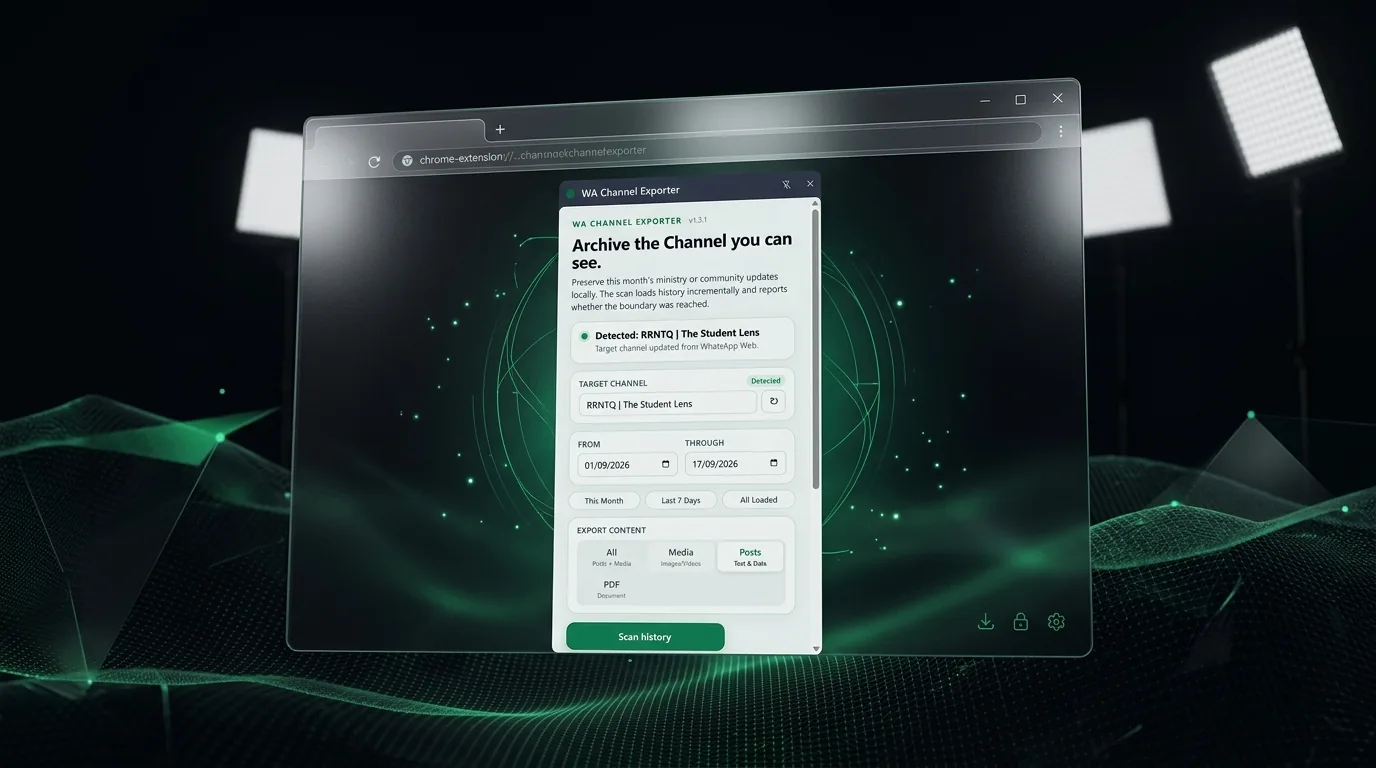
Inside the Extension
A clean, lightweight side panel that works right alongside WhatsApp Web.
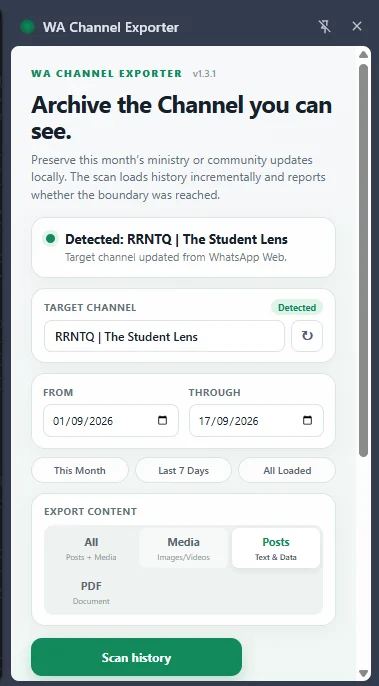
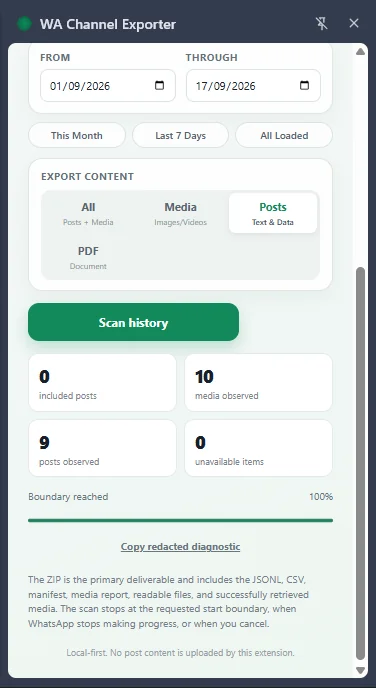
How to Download WA Channel Messages
- Download the extension
.zippackage using the button above. - Open a channel in WhatsApp Web and make sure the updates you want to archive are loaded.
- Open Chrome and navigate to
chrome://extensions. - Toggle on "Developer mode" in the top right corner, then simply drag and drop the downloaded file into the window.
✓✓ The extension is now installed and ready to download channel messages from WhatsApp Web!
What Is a WA Channel Exporter?
WA Channel Exporter is an independent, open-source, client-side Chromium extension for saving, archiving, and downloading public channel updates from WhatsApp Web. Because standard conversational backup utilities only support traditional peer-to-peer or group messaging, they fail when attempting to read the virtualized DOM stream powering the WhatsApp Channels Updates feed.
Operating completely within your active browser session without remote servers, phone number logins, or cloud databases, this tool progressively captures published announcements, recovers original full-resolution media blobs, and compiles a comprehensive offline ZIP package. Each archive contains an offline dark-mode HTML reader, structured CSV spreadsheet, enriched Markdown for Notion or Obsidian, and chronologically organized asset subfolders.
✓✓ Zero Cloud Exposure: 100% client-side execution ensures your data remains completely private on your local machine.
Independence: WA Channel Exporter is an independent open-source project, not affiliated with, sponsored by, or endorsed by WhatsApp or Meta.
Comparison: WA Channel Exporter vs Alternatives
Why traditional chat utilities fail on broadcast feeds and how client-side archiving excels.
| Feature / Capability | WA Channel Exporter (Local) | Native WhatsApp "Export Chat" | Third-Party Cloud Scrapers |
|---|---|---|---|
| WhatsApp Channels Support | ✓ Dedicated Updates Engine | ✗ Unsupported (Chats Only) | ⚠ Inconsistent / Fails |
| Data Privacy & Security | ✓ 100% In-Browser (Zero Cloud) | ✓ Local Device Processing | ✗ Cloud Servers / Third-Party |
| Bulk Media Extraction | ✓ Chronological Subfolders | ⚠ Manual 1-by-1 Only | ⚠ Throttled / Incomplete |
| Export Format Diversity | ✓ HTML Viewer, CSV, MD, ZIP | Plain Unformatted .TXT | Proprietary Cloud Format |
| Account Activity | ✓ Read-only browser processing | ✓ Safe (First-Party Feature) | ✗ High Risk (Automated API Calls) |
| Pricing & Open Source | ✓ Free & MIT Open-Source | ✓ Free | ✗ Paid Monthly Subscription |
Who Is WA Channel Exporter For?
Different users need to download, export, save, or analyze WA Channel updates for different reasons. Choose the workflow that fits your work.
Journalists & Researchers
Download WhatsApp Channel messages, public statements, crisis updates, and health information into time-stamped archives for reporting and research.
OSINT Analysts & Investigators
Export WhatsApp Channel updates and media consistently for repeatable analysis, internal reports, and documented investigations.
NGOs & Legal Teams
Save WhatsApp Channel updates, statements, and media locally for advocacy, review, and responsible documentation of public information.
Brands & Marketing Teams
Monitor competitor announcements, product launches, pricing changes, and campaigns shared through WhatsApp Channels.
Channel Admins & Creators
Download your own WA Channel posts, photos, videos, and voice notes for backup, repurposing, newsletters, or long-term archives.
Compliance & Records Teams
Archive WhatsApp Channel communications in consistent local packages that can be retained and reviewed under your organization’s records process.
Archives document what the browser captured at the time of scanning; they are not automatically tamper-evident and do not guarantee legal admissibility.
What You Get in Your Archive
Everything you need, compiled into a single, clean .zip file.
Offline HTML Viewer
Double-click index.html to browse past updates offline with an authentic dark messenger theme and embedded media players.
Download Channel Media
Photos, videos, and voice recordings are automatically organized into date-stamped subfolders (media/YYYY-MM-DD/) for easy file management.
CSV & Markdown
Export to posts.csv for spreadsheet analytics, or load formatted posts.md with image references into Obsidian or Notion.
100% Local Privacy
Zero server uploads, zero logins, zero telemetry. All processing happens directly inside your browser session. Your data stays yours.
Date-Bounded Scans
Pick custom start/end dates or use one-click presets like This Month, Last 7 Days, or All Loaded.
Honest Completeness
The archive honestly reports captured posts and downloaded media in a manifest.json audit log, ensuring complete transparency.
How Client-Side Archiving Works
Engineered for security, accuracy, and complete privacy.
1. DOM Virtualization Reader
WhatsApp Web recycles DOM nodes to preserve device memory. Our content script hooks the scroll container to capture historical updates progressively without triggering browser memory leaks. Each rendered card is parsed for timestamps, verified badges, and text payloads before being unmounted from the active viewport.
2. Local Blob Rehydration
Media files are fetched directly through the authenticated browser session as raw blobs, converted to base64 for message passing, and bundled with MIME preservation. By leveraging existing session credentials, extraction bypasses rate limits and avoids external API calls.
3. In-Browser ZIP Assembly
Using JSZip inside your browser, the tool generates a self-contained archive containing an authentic dark-theme HTML viewer, raw CSV, formatted Markdown, and your downloaded media. The resulting bundle requires zero external dependencies and runs completely standalone on any operating system.